
Most Facebook and Meta campaigns that appear to "not convert" are actually suffering from broken or undercounted conversion signal. Before you touch a single audience, creative, or budget setting, open Events Manager and check whether your Pixel and Conversions API are actually firing. Give it 48 hours, in that order, before making any structural changes.
TL;DR:
- Ensuring your Pixel and Conversions API fire correctly before making any campaign changes is critical, as tracking failures are the main cause of false non-conversion signals.
- Confirm that your optimization event aligns with your business goal, and avoid optimizing for one metric while measuring another, which skews performance assessment.
- Avoid fragmenting your budget across too many ad sets; aim for at least 50 conversions per week per ad set to allow effective learning and optimization.
- Improve landing page performance by matching messaging, reducing load times, minimizing friction, and removing unnecessary steps to increase actual conversion rates.
- Conduct a structured diagnostic process, including tracking verification, ad set consolidation, creative refreshes, and landing page audits, before testing new offers or creative elements.
Table of Contents
- Why Are My Facebook Ads Not Converting?
- What Should You Fix First When Ads Stop Converting?
- How Do You Verify Your Pixel and Conversions API Are Working?
- Are Your Landing Pages Losing Conversions After the Click?
- Is Creative Fatigue Killing Your Ad Performance?
- Are You Fragmenting Your Budget Across Too Many Ad Sets?
- Could the Offer Itself Be the Real Problem?
- What Does a Professional Ad Audit Actually Check?
- What Marketers Get Wrong About Diagnosing Ad Performance
- How Skyboundscaling Approaches a Stalled Ad Account
- Tools to Verify and Fix Your Facebook Ad Performance
- Sources
Why Are My Facebook Ads Not Converting?
Tracking failure is the single most common reason a campaign stalls, and it's also the easiest fix to overlook because everything still looks fine in Ads Manager. The dashboard shows spend, it shows clicks, it might even show a handful of results. What it doesn't show you is what's missing.
Here's the sequence worth running, in order, before you change anything else:
- Check Events Manager and Test Events. Open your Pixel in Meta's Events Manager, fire a test purchase or lead event, and confirm it registers in real time. Install Meta Pixel Helper in Chrome and reload your conversion page. If the Pixel Helper shows a warning or nothing at all, you've found your answer.
- Apply the 48-hour rule. If you or your team edited the campaign, creative, or pixel code in the last two days, wait before diagnosing further. Meta's delivery system needs that window to re-stabilize after any structural edit, and judging performance mid-reset produces false signals.
- Look for creative fatigue. A frequency above 3 to 4 combined with a falling click-through rate almost always means the same faces have seen your ad too many times.
- Confirm the optimization event matches your goal. If the campaign is optimizing for "Landing Page View" but you're judging it on purchases, you're comparing two different jobs.
- Compare CTR against conversion rate. A healthy CTR paired with a weak conversion rate points away from the ad and toward the page it sends people to.
- Check budget per ad set against required volume. Thin budgets spread across too many ad sets starve each one of the data it needs to optimize.
- Audit account and delivery status. A restricted account, a rejected ad, or a policy flag can throttle delivery without an obvious error message.
- Factor in seasonality and market noise. Auction costs shift around major shopping periods and holidays regardless of what you do.
- Only then, question the offer. If tracking, structure, creative, and page all check out and conversions are still weak, the product or offer itself may be the real bottleneck.
Pro Tip: Screenshot your Events Manager overview before you start diagnosing. If you fix five things at once, you'll never know which one actually mattered.
What Should You Fix First When Ads Stop Converting?
Not every fix belongs at the same point in the process, and fixing things out of order wastes both time and budget. Think of this as a decision tree, not a checklist you complete top to bottom in one sitting.
- Priority zero: tracking. If Test Events shows missing or delayed data, stop everything else. Every optimization decision you make while tracking is broken is a guess dressed up as a strategy.
- If tracking is confirmed working, check the optimization event and structure next. Make sure the campaign objective matches the event you actually care about, and consolidate ad sets that are each getting fewer than roughly 50 conversions a week.
- If the event and structure are correct, move to creative and the landing page. Refresh ad concepts if frequency is climbing and CTR is dropping. Check page load speed and message match if CTR is fine but conversions still lag.
- Last resort: the offer and audience temperature. Only test a new offer, discount, or audience segment after you've ruled out everything upstream.
Skipping straight to "let's try new creative" when your Pixel is undercounting by half is a common and expensive mistake. You'll spend two weeks testing concepts against a broken measurement system, then conclude the wrong thing entirely. The nine-point diagnostic framework that guides this order exists precisely because marketers keep solving symptoms instead of causes.
How Do You Verify Your Pixel and Conversions API Are Working?
Start in Events Manager. Navigate to your Pixel, click into Test Events, and trigger a real conversion on your site using an incognito browser. You should see the event populate within seconds, tagged with the correct value and currency. If nothing shows up, or it shows up with a warning icon, your browser-side tracking has a gap.
This gap is more common than most advertisers realize. Browser-only Pixel setups can miss an estimated 20 to 50% of events after iOS privacy changes and ad blockers took hold, which means Meta's algorithm has been optimizing against a fraction of your real conversions the whole time.
The fix is server-side tracking through the Conversions API (CAPI). If you're on Shopify, WooCommerce, or a similar platform, most have a native or app-based CAPI integration that sends purchase data directly from your server to Meta, bypassing browser restrictions entirely.
Two things to verify once CAPI is live:
- Deduplication. Both your Pixel and CAPI may fire for the same event. Make sure each event carries a matching
event_idso Meta counts it once, not twice. A double-counted event inflates your reported conversions and can mislead your entire read on performance. - Event Match Quality (EMQ). In Events Manager, check your EMQ score for each key event. Meta uses this score to judge how confidently it can match an event to a real person. Higher parameter completeness, meaning email, phone, and name hashed correctly, pushes that score up and generally improves delivery.
Undercounting and double-counting cause different problems. Undercounting starves the algorithm of signal, so it can't tell which audiences and placements actually convert. Double-counting does the opposite: it tells Meta something is working better than it is, which can push budget toward the wrong ad set. Comparing your Ads Manager conversion count against actual backend orders in your CRM or store is the fastest way to catch either problem.
If you'd rather have someone else own this diagnostic, Skyboundscaling's Meta ads management work starts with exactly this kind of tracking audit before touching a single ad set.
Are Your Landing Pages Losing Conversions After the Click?
Compare your link click-through rate to your landing page conversion rate. If people are clicking at a healthy rate but bouncing once they land, the ad isn't your problem. The page is.
A few checks recover conversion rate faster than almost anything else you can do:
- Match the message. The headline on your landing page should echo the promise in your ad almost word for word. A gap between what the ad said and what the page delivers reads as a bait-and-switch, even when it's unintentional.
- Test load speed. Run your URL through PageSpeed Insights and look specifically at mobile scores, since most Facebook traffic arrives on a phone. Compress hero images and defer any script that isn't needed for the first screen.
- Simplify the above-the-fold experience. One clear call to action, one headline, and no scroll required to understand the offer.
- Remove friction from the form or checkout. Every unnecessary field is a reason for someone to leave.
- Place social proof near the decision point, not buried at the bottom of the page where nobody scrolls.
A high CTR paired with a weak conversion rate is one of the clearest signals in advertising: the ad worked, and the page didn't hold up its end.
Pro Tip: Run A/B tests in pairs, not isolation. Test a new ad creative against your current landing page, and your current creative against a new landing page. That tells you which side of the click actually moved the number.
Skyboundscaling's landing page and funnel work exists specifically for this gap between click and conversion.
Is Creative Fatigue Killing Your Ad Performance?
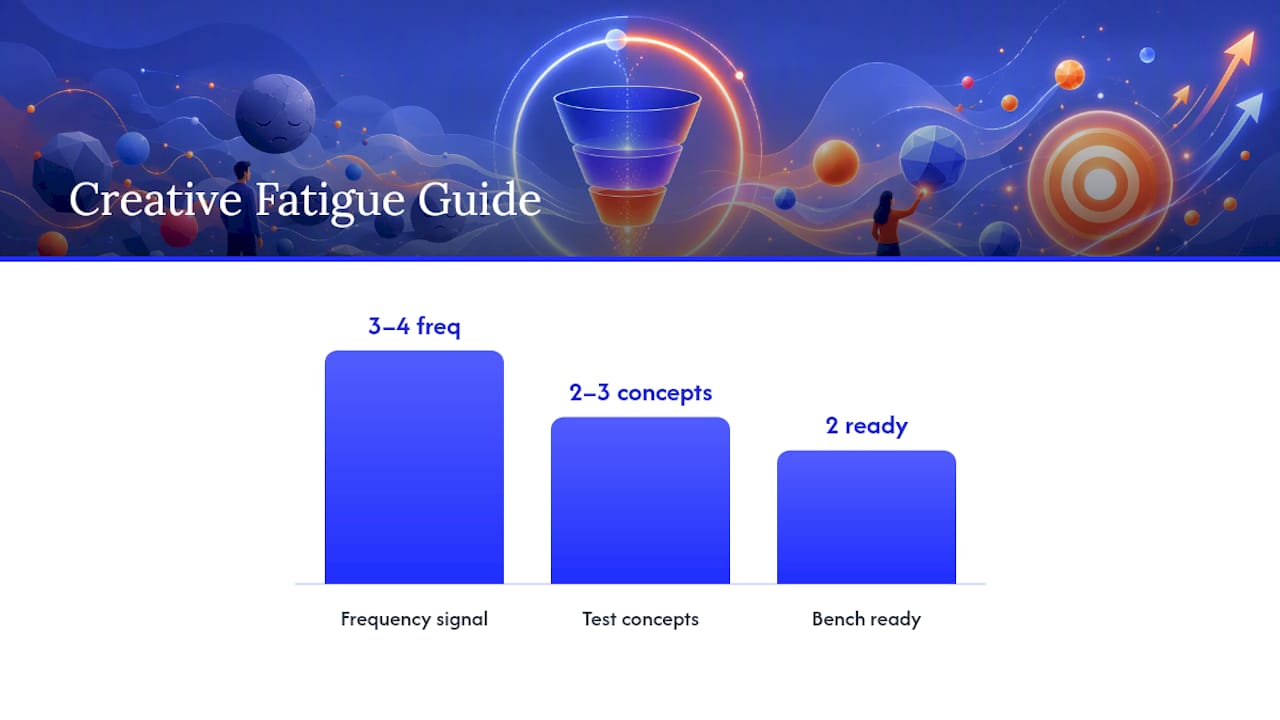
Frequency climbing past 3 or 4 while CTR drops is the clearest fatigue signal Ads Manager gives you. The same people are seeing the same ad too many times, and they've stopped responding to it.
What actually fixes fatigue isn't a new headline on the same image. It's a genuinely different concept: a new angle, a different format like video instead of static, or a new hook entirely. Cosmetic tweaks rarely move the needle because the underlying appeal hasn't changed, only the wrapping.
A workable testing cadence looks like this:
- Develop 2 to 3 distinct creative concepts, not variations of one idea.
- Pair each concept with the same landing page so you isolate creative as the variable.
- Watch CTR, CPM, and engagement rate over the first several days rather than judging on day one.
- Pause underperformers early, but give each concept enough spend to generate real signal before you decide.
Creative novelty tends to matter more than small copy edits when performance has genuinely stalled from fatigue rather than fallen off from a broken measurement system.
Pro Tip: Keep a rotating bench of at least two fresh concepts ready before your current top performer starts fading. Reacting after CTR craters costs you days of poor delivery you can't get back.
Are You Fragmenting Your Budget Across Too Many Ad Sets?
Meta's algorithm needs a minimum volume of conversion events per ad set to learn who to show your ad to. Split your budget too thin across too many ad sets, and none of them ever accumulate enough data to optimize properly. This is one of the most common structural mistakes in accounts that otherwise have solid tracking and creative.
- Aim for roughly 50 conversions per week per ad set. That's the general benchmark practitioners point to for stable, out-of-learning delivery.
- Work backward from your cost per conversion. If a conversion averages $40 and you need 50 a week, that ad set needs roughly $285 a day, not $20.
- Consolidate rather than multiply. Five ad sets each spending $15 a day rarely outperform one ad set spending $75 a day with the same targeting logic.
- Expect a reset after consolidation. Merging ad sets restarts the learning phase, so give it the same 48-hour patience window before judging results.
- Scale conservatively. Increase budget in increments of 15 to 20% rather than doubling overnight, which can throw a stable ad set back into learning.
If you've confirmed tracking is clean and creative is fresh but results are still inconsistent, budget concentration is usually the next place to look, well before touching the offer itself.
Could the Offer Itself Be the Real Problem?
Sometimes the ad, the tracking, and the landing page are all doing their job, and the offer simply isn't compelling enough to convert. You'll know because clicks stay steady and cheap while conversion rate stays flat no matter what creative or page combination you try.
- For cold audiences who don't know you yet, a discount, a low-commitment lead magnet, or a risk reversal like a free trial tends to lower the barrier enough to convert.
- For warmer audiences who've already engaged, retargeting sequences with a more direct, sales-focused offer usually outperform a repeat of the same cold-traffic pitch.
- If neither cold nor warm offers move the number, the issue may sit downstream of the ad entirely, inside your checkout flow or pricing itself, which is worth auditing directly through conversion rate optimization work rather than more ad testing.
What Does a Professional Ad Audit Actually Check?
A proper recovery audit doesn't start with creative opinions. It starts with a structured pass through the same signals covered above, run in the correct order so nothing gets misdiagnosed.
- Verify Pixel and CAPI events fire correctly and deduplicate through matching event IDs.
- Confirm the optimization event matches the campaign's actual business goal.
- Review ad set structure and consolidate where budgets are too fragmented to generate learning volume.
- Audit landing page message match, mobile speed, and friction points against current creative.
- Cross-check Ads Manager conversion counts against real backend orders to catch undercounting.
This is the same sequence Skyboundscaling runs during an initial Meta ads diagnostic, typically completed within 48 to 72 hours before any campaign changes go live.
What Marketers Get Wrong About Diagnosing Ad Performance
Most accounts I've seen struggle don't have a strategy problem. They have a sequencing problem. Someone notices conversions dropped, panics, and rewrites three ad sets, swaps the creative, and changes the budget all in the same afternoon. Now nothing is measurable, because five variables moved at once.
The instinct to chase creative first is understandable. It's the most visible, most editable piece of the campaign. Fix signal, then structure, then creative and page, in that order. If two weeks of disciplined fixes don't restore performance, that's the point where bringing in a specialist stops being an expense and starts being the faster path to an answer.
— Ahmad
How Skyboundscaling Approaches a Stalled Ad Account
Some agencies run diagnostics differently than most freelancers or one-off consultants, because ad recovery is only one piece of a system that can include tracking infrastructure, landing pages, and conversion rate optimization together. That matters when your problem could be tracking, could be the page, or could be both at once, and you don't want to hire three separate specialists to find out.
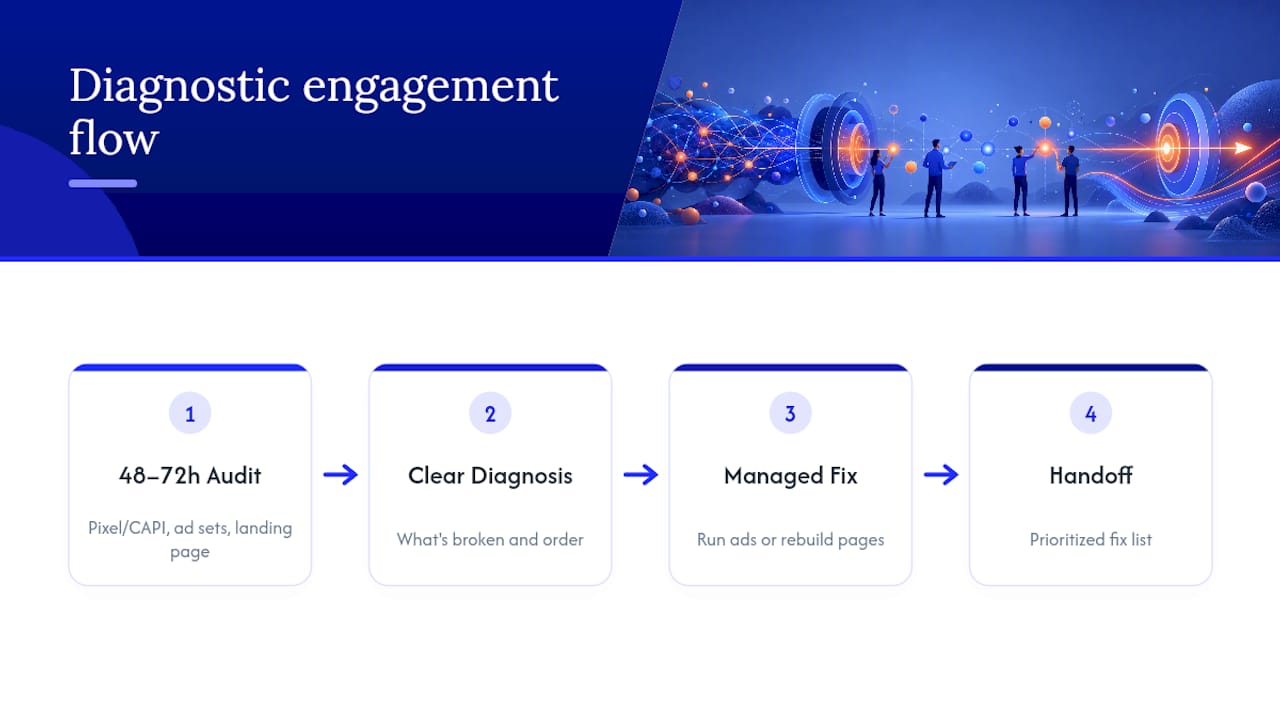
A typical diagnostic engagement starts with the same 48-to-72-hour audit outlined above: Pixel and CAPI verification, ad set consolidation review, and a landing page pass against current creative. Clients usually leave that window with a clear answer, not a guess, about what's actually broken and what order to fix it in. From there, Skyboundscaling's team can manage the Meta ad campaigns directly, rebuild underperforming landing pages, or hand you a prioritized fix list to run in-house.
If your account has been stalled for more than two weeks and the checklist above hasn't moved the number, book a diagnostic through Skyboundscaling's main site and get a straight answer on what's actually broken.
Tools to Verify and Fix Your Facebook Ad Performance
Run these checks yourself before or alongside any professional audit:
- Meta Events Manager for live event testing and Pixel diagnostics
- Meta Pixel Helper for a quick browser-side firing check
- PageSpeed Insights for mobile load speed and CRO diagnostics
- Your CRM or e-commerce platform's own order log, cross-checked against Ads Manager to catch undercounted conversions
Between these four checks and the priority order above, most stalled accounts reveal their actual problem within a day, not a month of guesswork.